Why Your Checkout Says “No Shipping Methods Available” (And How to Fix It)

UptimeClick Infrastructure Team
9 min read
The Silent Order Killer at the Final Step
Your marketing campaigns worked. The customer selected their product variants, reviewed their cart, entered their contact email, and typed in their exact street address and ZIP code.
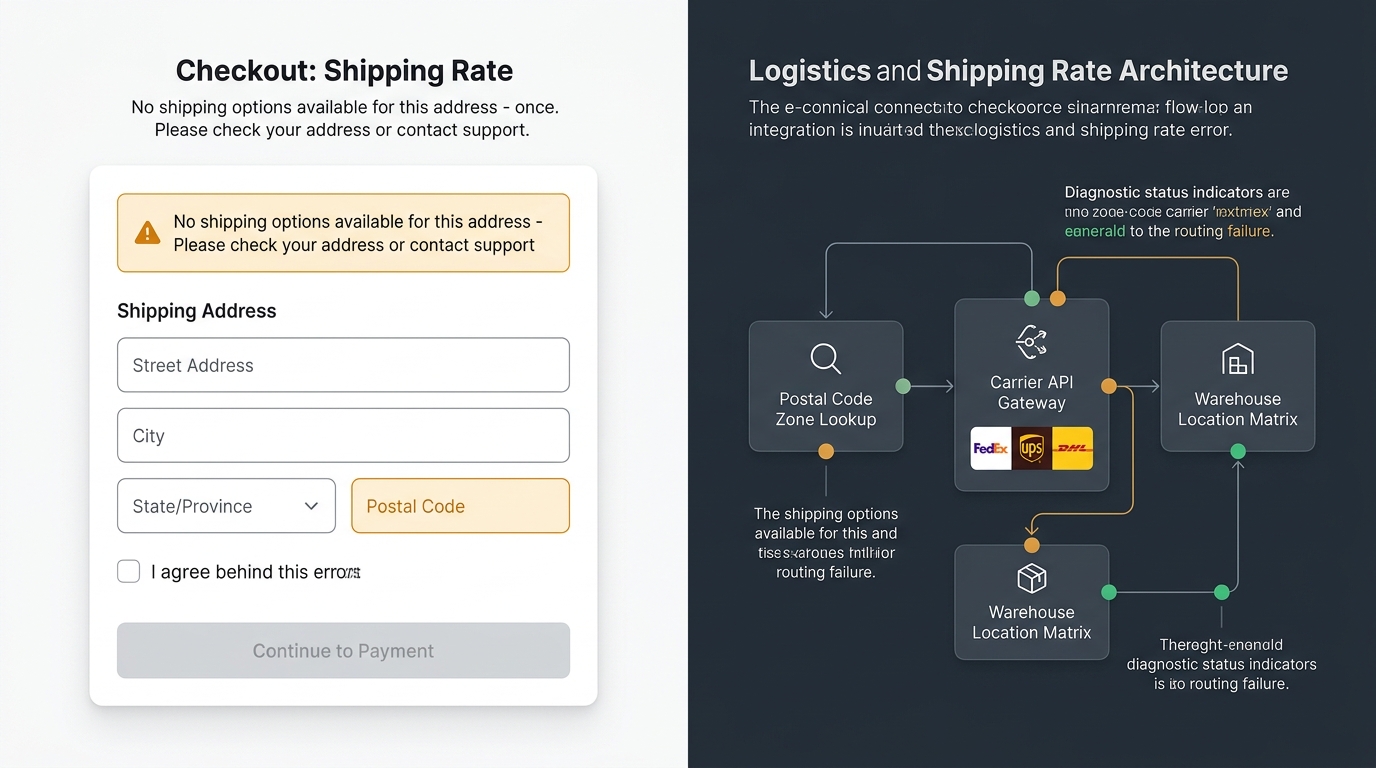
Then, instead of choosing standard or express delivery, the shipping step freezes. An amber or red banner appears: “There are no shipping options available for your address” (or in WooCommerce, “No shipping options were found for your location”).
Directly below the message, the “Continue to Payment” button remains stubbornly greyed out and unclickable. The customer is trapped. They cannot select a delivery method, they cannot enter a credit card, and they cannot complete the order.
According to e-commerce benchmark data, over 72% of shoppers hit by a shipping rate failure abandon the session permanently within 45 seconds. Even worse, merchants rarely discover the outage until days later, because standard uptime monitors only check if the homepage returns an HTTP 200 status.
Want automated verification that your 'Place Order' button actually works?
Standard HTTP ping monitors only check server status codes and miss broken JavaScript hydration, invisible overlays, and disabled checkout buttons. UptimeClick runs real headless Chromium every 2 hours to verify that buttons like Place Order or Complete Purchase are physically actionable—alerting you immediately with error screenshots if a click fails.
The Shipping Calculation Pipeline: Where the Chain Breaks
In modern e-commerce architectures (Shopify, WooCommerce, Magento, Shopware), delivery rates are not static variables. Every time an address field changes, the frontend triggers an asynchronous background request to calculate matching shipping rates:
If any single node in this sequence returns an empty payload, throws an uncaught exception, or times out, the checkout controller defaults to an empty rates array: shipping_rates: []. The frontend UI responds by setting the primary call-to-action button to disabled = true.
The 5 Hidden Culprits Behind Missing Shipping Methods
1. Missing Product Weights or Dimensions on Calculated Rates
This is the single most frequent cause of intermittent shipping failures. If your store uses table-rate shipping plugins, weight-based brackets, or carrier-calculated rates (USPS, FedEx, DHL), every single item in the cart must have defined weight and dimension values.
When a merchant adds a new product or variant but forgets to enter the weight (leaving it as 0 kg or empty), the carrier API calculation fails. The shipping API cannot calculate volumetric dimensional weight for a package of zero mass, rejects the quotation request, and returns zero options.
// Example API response when product dimension is missing
{
  "error": {
    "code": "INVALID_PACKAGE_WEIGHT",
    "message": "Package weight must be greater than 0.00 lbs for carrier USPS_PRIORITY",
    "status": 422
  },
  "rates": []
}
2. Top-to-Bottom Shipping Zone Priority Clashes
In WooCommerce and custom commerce platforms, shipping zones are evaluated strictly from top to bottom based on order of priority.
If you have a hyper-specific zone (e.g., “California Special Delivery”) positioned above your broader “United States Domestic” zone, any shopper entering a California ZIP code matches the first zone immediately. If that specific zone has conditional restrictions (such as order value over $100) and the customer’s cart is $85, WooCommerce does not fall through to the general domestic zone—it halts evaluation and displays “No shipping options were found”.
3. Multi-Location Inventory Splitting (Shopify & Magento)
In stores with multiple fulfillment warehouses or retail store pickup locations, a single order may contain items fulfilled from different physical locations:
- Item A is stocked only at Warehouse East (New York).
- Item B is stocked only at Warehouse West (Los Angeles).
Shopify calculates rates by evaluating shipping profiles for each location independently and summing the resulting rates. If Warehouse West does not have an active rate profile configured for the customer’s destination country, the combined order cannot be fulfilled, and the entire checkout blocks the customer.
4. Live Carrier API Outages, Throttling, and Expired OAuth Tokens
Carrier-calculated shipping relies on synchronous HTTP requests to external logistics APIs (FedEx Web Services, UPS REST API, Shippo, EasyPost). These integrations suffer from real-world network vulnerabilities:
- OAuth Token Expiration: When refresh tokens fail to renew, carrier API calls return
401 Unauthorizedsilently in the background. - Rate-Limiting (HTTP 429): During flash sales, sending hundreds of concurrent rate requests to a carrier endpoint exceeds API quota limits.
- Gateway Timeouts: If the carrier server takes longer than 5 seconds to reply, the e-commerce checkout times out the rate request to prevent an infinite page hang.
Unless your store has an automated fallback rate configured, a carrier API slowdown of just 3 minutes halts all store revenue for that duration.
5. Stale Checkout Sessions and Edge Cache Contamination
Aggressive full-page caching rules (via Cloudflare, Varnish, or WP Rocket) can inadvertently cache dynamic cart fragments or AJAX nonces.
When a customer selects a different country or enters their postal code, the frontend sends an AJAX update request (such as /?wc-ajax=update_order_review). If the edge proxy serves a cached response or rejects the request due to an expired CSRF security nonce, the checkout retains the previous geographic location, failing to calculate valid shipping rates.
Step-by-Step Triage Checklist: How to Fix It Today
Follow this systematic diagnostic procedure to isolate and eliminate shipping rate failures:
Step 1: Activate Shipping Debugging
In WooCommerce, navigate to WooCommerce > Settings > Shipping > Shipping options. Scroll to the bottom and check “Enable debug mode”.
Visit your checkout page in an incognito window and test the problematic address. WooCommerce will render an administrative notice showing:
- Which shipping zone the customer matched.
- Which individual shipping methods were evaluated.
- The exact rejection reason (e.g., minimum cart threshold unmet or weight bracket exceeded).
Step 2: Always Provide a Universal Fallback Rate
Never leave the default “Locations not covered by your other zones”profile empty. If an international buyer or military APO/FPO address arrives at checkout, having a configured “Standard International Delivery” or manual quote fallback ensures the payment button remains active.
Step 3: Audit Product Catalog for Zero-Weight Items
Run a quick database query or CSV export to identify active physical products with missing mass parameters:
-- SQL check for WooCommerce physical products missing weight data
SELECT p.ID, p.post_title
FROM wp_posts p
LEFT JOIN wp_postmeta pm ON p.ID = pm.post_id AND pm.meta_key = '_weight'
WHERE p.post_type = 'product'
  AND p.post_status = 'publish'
  AND (pm.meta_value IS NULL OR pm.meta_value = '' OR pm.meta_value = '0');
Step 4: Configure Carrier Resilience Fallbacks
If using carrier plugins (like FedEx or UPS), verify that the plugin supports a “Fallback Rate” setting. Enter a conservative flat rate (e.g., $15.00 Flat Rate Shipping). If the carrier API fails to respond within 3 seconds, the checkout automatically falls back to this flat rate, preserving the order and allowing your fulfillment team to adjust shipping labels later.
Diagnostic Comparison: Root Causes & Solutions
| Error Symptom | Primary Root Cause | Affected Platforms | Recommended Resolution |
|---|---|---|---|
| No rates for single product | Missing item weight or dimensions | WooCommerce, Shopify | Assign default weight/dimensions in catalog |
| All rates disappear simultaneously | Carrier API downtime or expired credentials | All platforms with live rates | Add static fallback rate; renew API tokens |
| Specific state/region fails | Zone priority hierarchy mismatch | WooCommerce | Reorder shipping zones; check postal code rules |
| Cart with multiple items fails | Multi-warehouse fulfillment zone gap | Shopify, Magento | Ensure all inventory locations have active delivery profiles |
How Synthetic Monitoring Catches Shipping Glitches Automatically
The most dangerous aspect of shipping calculation bugs is their invisible nature. Your server is completely healthy, database queries are executing in milliseconds, and the homepage returns HTTP 200 OK.
Passive ping monitors will never detect when a shipping carrier API goes down or when a new product variant breaks the rate calculation.
This is why modern e-commerce stores rely on synthetic browser monitoring with UptimeClick. Instead of passive network pings, UptimeClick executes real headless Chromium sessions:
- Navigates to your actual product pages and adds items to the shopping basket.
- Fills in realistic test shipping addresses and ZIP codes.
- Verifies that delivery rate radio buttons render dynamically and are selectable.
- Asserts that the primary “Continue to Payment” button remains clickable and active.
- Captures visual screenshots and console logs the second a rate failure occurs, dispatching instant alerts to your Slack, WhatsApp, or email.
Frequently Asked Questions
Can a customer still complete checkout if no shipping methods appear?
No. Almost all major e-commerce platforms (Shopify, WooCommerce, Magento) strictly require a valid shipping method to calculate total taxes and order amounts. When no shipping methods are available, the checkout engine hard-disables the payment button, completely blocking order placement.
Why does the error occur only when a customer buys a specific product?
This almost always indicates a missing attribute on that specific product: either the product has no weight/dimensions entered (causing carrier calculation formulas to divide by zero or fail), or the product is assigned to a custom shipping class or inventory location that lacks configured shipping rules.
How do I prevent carrier API downtime from halting store sales?
Configure a fallback flat rate in your carrier shipping plugin. If FedEx or UPS experiences an outage and fails to return live quotes within 3–5 seconds, the checkout automatically falls back to your static rate, allowing customers to pay and complete their purchases uninterrupted.
Never Let Broken Shipping Rates Block Your Purchase Buttons
UptimeClick continuously tests your checkout forms, shipping selections, and payment buttons in real Chromium browsers 24/7. Get instant alerts before hidden rate glitches destroy your conversion rate.