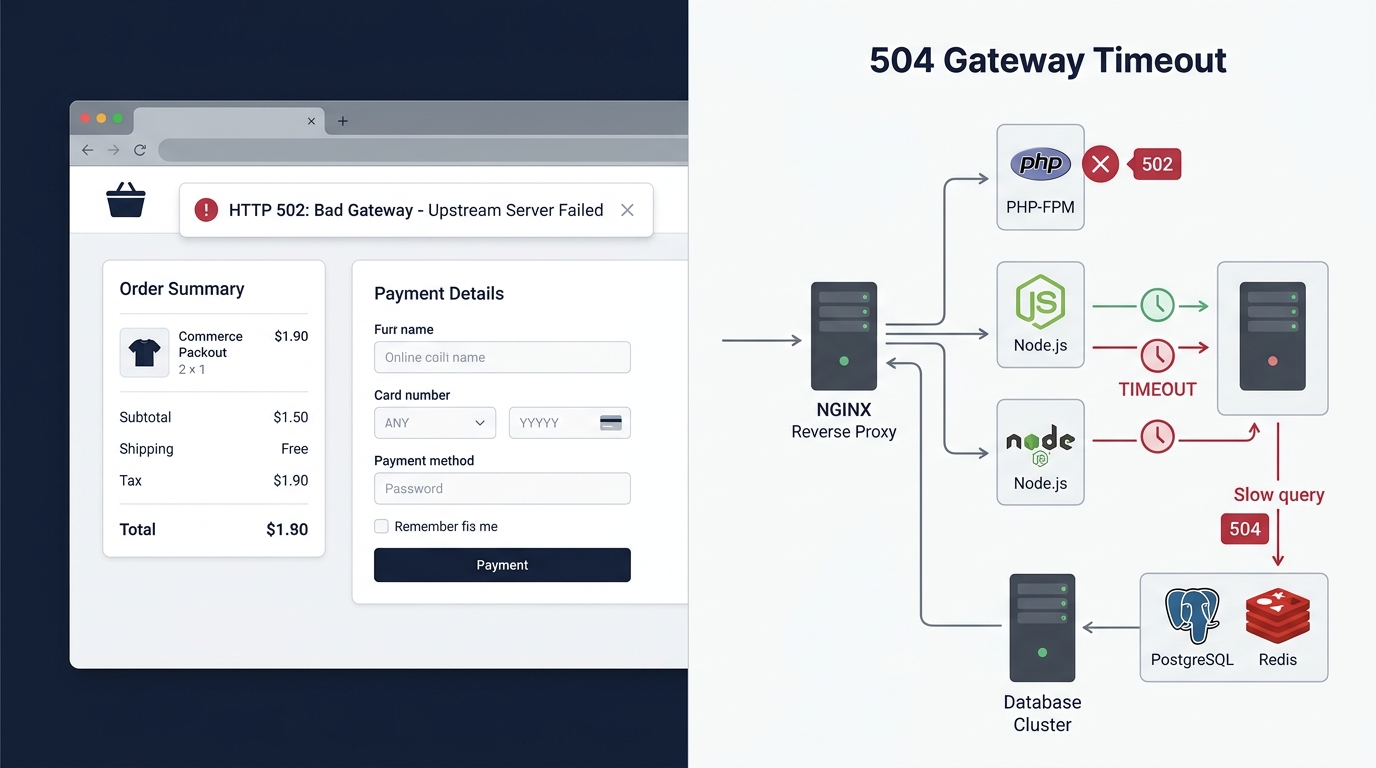
Why Is Your Checkout Returning a 502 Bad Gateway or 504 Timeout?

UptimeClick Infrastructure Team
8 min read
The Worst Possible Time for a Server Crash
A customer has already passed the consideration phase. They browsed your catalog, added products to their cart, filled out billing details, and clicked “Pay Now”.
Instead of an order confirmation number, their browser renders a stark white screen with bold black text: “502 Bad Gateway: The server returned an invalid response” or “504 Gateway Time-out”.
From a buyer’s perspective, this is terrifying. Did the transaction go through? Was their credit card charged? Because they cannot verify their order status, they hesitate to try again. Over 80% of shoppers hit by a gateway error never return to complete the order—they abandon the store permanently and purchase from Amazon or a direct competitor.
Meanwhile, marketing teams continue pouring budget into Google and Meta Ads, completely unaware that the checkout funnel is bleeding revenue at the final inch.
Want automated verification that your 'Place Order' button actually works?
Standard HTTP ping monitors only check server status codes and miss broken JavaScript hydration, invisible overlays, and disabled checkout buttons. UptimeClick runs real headless Chromium every 2 hours to verify that buttons like Place Order or Complete Purchase are physically actionable—alerting you immediately with error screenshots if a click fails.
502 vs. 504: Understanding the Architectural Breakdown
To fix these errors permanently, you must first understand your web server’s proxy architecture. Modern e-commerce platforms (WooCommerce, Magento, Shopware, and custom headless stacks) rarely serve requests directly from application code. Instead, they use a multi-tiered architecture:
The reverse proxy acts as the gatekeeper. When a customer attempts to check out, the reverse proxy forwards the request upstream to the application server and waits for the response. The error codes indicate exactly where this pipeline ruptured:
- HTTP 502 Bad Gateway: The reverse proxy reached out to the backend application worker, but the backend crashed, ran out of memory, or returned an invalid or empty HTTP packet. The proxy received an invalid response and had to abort.
- HTTP 504 Gateway Timeout:The reverse proxy established contact with the backend worker, but the backend took too long to complete its work (such as executing an unindexed database query or waiting on an external shipping API). The proxy’s internal timer (e.g., 30s or 60s) expired before the backend sent back any data.
Why Your Homepage Loads Fast While Checkout Crashes
One of the most confusing symptoms for store owners is that their store appears completely healthy when they load the homepage or category pages.
The reason is simple: caching layers. High-traffic pages (home, collection, and product detail pages) are aggressively cached by Edge CDNs (Cloudflare, Fastly) and local page caches (Varnish, Redis, LiteSpeed). Serving a cached page requires virtually zero CPU or database computation.
Checkout requests, however, can never be cached. Every single order submission must:
- Generate unique customer and cart session records.
- Perform real-time inventory locking (to prevent overselling).
- Execute live tax calculation queries based on postal codes.
- Initiate synchronous SSL handshakes with payment gateways (Stripe, PayPal, Adyen).
- Commit transactional rows across multiple relational database tables.
If your backend application pool is barely keeping up during standard traffic, a small spike in checkouts exhausts all available workers in seconds, triggering a cascade of 502 and 504 errors while cached pages stay responsive.
The 4 Hidden Bottlenecks Behind Checkout Gateway Errors
1. PHP-FPM Worker Pool Starvation (Max Children Reached)
In PHP-based stores (WooCommerce, Magento), PHP-FPM manages a finite pool of child worker processes to execute incoming requests. If your server is configured with pm = dynamic and pm.max_children = 20, your server can only process 20 simultaneous dynamic requests at any single millisecond.
When a surge of shoppers submit orders, or if a few slow database queries cause workers to linger for 10 seconds each, all 20 worker slots become saturated. New incoming checkout requests are placed in the backlog queue:
# Typical PHP-FPM log error when checkouts fail
[WARNING] [pool www] server reached pm.max_children setting (20),
          consider raising it
[ERROR]   [pool www] child 1482 exited on signal 9 (SIGKILL)
          after 60.002 seconds
If the backlog queue fills up, PHP-FPM actively refuses connections, and Nginx immediately returns 502 Bad Gateway.
2. Synchronous External API Deadlocks
Modern e-commerce themes rely heavily on third-party integrations: automated sales tax calculation (Avalara, TaxJar), real-time carrier shipping rates (FedEx, DHL), ERP inventory lookups, and anti-fraud scoring.
If these integrations execute synchronously inside the checkout request lifecycle, your store is held hostage by third-party latency. If the shipping carrier’s rate server takes 35 seconds to respond due to their own internal slowdown, your web server exceeds its 30-second proxy timeout and dumps a 504 Gateway Timeoutonto your customer’s screen.
3. Database Table Locking and Index Deficits
During order submission, the database must write to multiple tables simultaneously: orders, line items, order metadata, customer profiles, and stock balances.
If your database tables use legacy storage engines like MyISAM (which locks the entire table during every write) instead of InnoDB (which uses row-level locking), a single checkout locks all other shoppers out of the cart tables. Even with InnoDB, unindexed queries on large wp_postmeta or order history tables can cause CPU spikes of 100%, causing queries to wait until the proxy times out.
4. Reverse Proxy Timeout Mismatches
A common misconfiguration occurs when proxy timeouts are shorter than backend script execution limits:
- PHP
max_execution_timeis set to 120 seconds. - Nginx
fastcgi_read_timeoutis set to 30 seconds.
If a complex cart with 15 custom product bundles takes 32 seconds to process shipping logic, PHP is still actively running without errors, but Nginx gives up at second 30 and drops a 504 timeout onto the user.
Step-by-Step Server Triage Checklist
If customers report 502 or 504 errors on your checkout, follow this sequential debugging procedure:
Step 1: Check Nginx / Apache Error Logs
Access your server terminal and inspect the latest proxy error logs:
tail -n 50 /var/log/nginx/error.log- If you see
connect() to unix:/var/run/php/php8.2-fpm.sock failed (111: Connection refused), PHP-FPM crashed or stopped running. - If you see
upstream timed out (110: Connection timed out) while reading response header from upstream, the issue is an execution bottleneck (504 Timeout).
Step 2: Increase Proxy and FastCGI Timeouts
To give complex checkout computations adequate buffer time while you optimize backend code, adjust your Nginx configuration:
# Nginx FastCGI timeout tuning
fastcgi_read_timeout 180s;
fastcgi_send_timeout 180s;
fastcgi_connect_timeout 60s;

# If using a reverse proxy to Node.js / Python
proxy_read_timeout 180s;
proxy_connect_timeout 60s;
proxy_send_timeout 180s;
Step 3: Calculate Safe PHP-FPM Worker Capacity
Never set pm.max_childrento an arbitrary number. Calculate your server’s actual capacity based on available RAM:
# Safe PHP-FPM worker capacity formula
pm.max_children = (Total Server RAM - OS Reserved RAM)
                  / Average PHP Process Memory Size
For example, on an 8GB RAM server where the OS and MySQL use 3GB, leaving 5GB (5120MB) for PHP: if each WooCommerce PHP process averages 100MB, your safe maximum is 5120 / 100 = 51 children.
502 Bad Gateway vs. 504 Gateway Timeout
| Status Code | Root Cause | Server Log Signature | Primary Fix |
|---|---|---|---|
| 502 Bad Gateway | Application worker crash (OOM) or port refusal | Connection refused / closed keepalive connection | Raise PHP memory limit, restart service daemon |
| 504 Gateway Timeout | External API lag, slow database query | upstream timed out (110: Connection timed out) | Increase fastcgi_read_timeout, optimize slow SQL |
| 502 (Cloudflare) | Origin web server dropped TCP handshake | Bad Gateway: Host Error | Check origin server CPU, verify Cloudflare IP whitelist |
| 504 (Cloudflare) | Origin server took >100s to reply | Gateway Time-out: Origin Timeout | Move heavy processing (emails/webhooks) to queues |
How Synthetic Monitoring Catches Gateway Failures Early
When a checkout throws a 502 or 504 error, traditional ping monitors like UptimeRobot or Pingdom often remain completely silent. Because your homepage is cached by Cloudflare and returns a healthy 200 OK status code, the ping checker assumes your entire store is operational.
This is why synthetic transaction monitoring is essential. Unlike passive network pings, UptimeClick launches real desktop Chromium browsers to:
- Navigate to your actual product pages and execute Add to Cart clicks.
- Verify that the shopping cart drawer and checkout routes load dynamically.
- Submit test checkout interactions to ensure the upstream application server responds within latency thresholds.
- Detect when an order button triggers a 502 Bad Gateway or 504 Timeout in real time.
- Capture full DOM error logs and visual screenshots, alerting your engineering team before hundreds of shoppers are turned away.
Frequently Asked Questions
Can a customer get double-charged if they see a 504 Gateway Timeout?
Yes, this is one of the biggest risks of 504 timeouts. The payment processor may have successfully captured the charge, but because the web server timed out before recording the order in your database, no confirmation page was rendered. The confused buyer clicks “Pay” again, resulting in a duplicate charge. Always use idempotency keys in your payment gateway integrations to prevent duplicate authorizations.
Why does my store hit 502 errors only during email marketing blasts?
Email blasts drive hundreds of simultaneous visitors directly to your checkout. Unlike organic browsing, which spreads out over hours, promotional surges saturate the PHP-FPM worker pool instantly. If your server is under-provisioned, workers crash under memory pressure, triggering 502 errors.
Does Cloudflare cause 502 and 504 errors?
Cloudflare merely reports the error when your origin hosting server fails to reply. A Cloudflare 502 or 504 branded error screen means Cloudflare attempted to connect to your server IP, but your origin server either actively refused the connection or took longer than 100 seconds to respond.
Never Let Server Gateway Timeouts Silently Kill Your Sales
UptimeClick tests your actual purchase buttons and checkout responsiveness in real Chromium desktop browsers 24/7. Get instant alerts and diagnostic screenshots the moment your checkout fails.