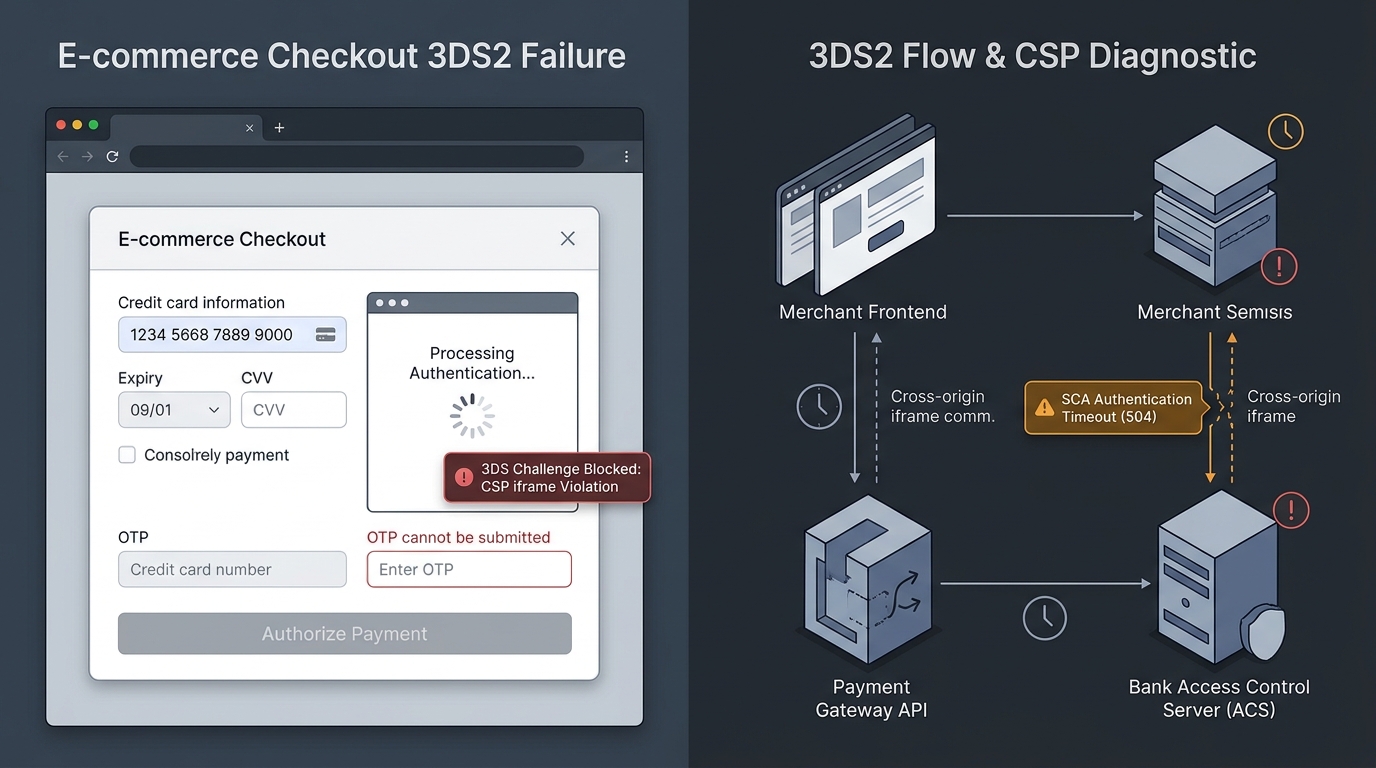
Why Your Checkout Fails 3D Secure (3DS) & OTP Verification (And How to Fix It)

UptimeClick Infrastructure Team
10 min read
The High-Intent Customer at the Point of No Return
Your ad targeting was flawless. The customer navigated your store, added items to their basket, filled in their shipping address, entered their 16-digit credit card number, and clicked “Pay Now”.
In European, UK, Latin American, and global markets governed by Strong Customer Authentication (SCA / PSD2), the checkout doesn’t charge the card immediately. It initiates a 3D Secure (3DS2) verification handshake.
And then, the critical transaction collapses:
- The White Screen of Death: A modal pops up over the checkout, but it remains completely blank. The bank’s OTP form never renders.
- The Mobile App-Switch Amnesia: The shopper switches to their banking app (e.g., Chase, Revolut, Monzo) to tap “Approve”. When they switch back to Safari or Chrome, the tab refreshes, the cart resets to zero, and no confirmation is displayed.
- The Infinite Authorization Spinner: The customer types their SMS one-time passcode (OTP) and hits Submit. The button spins endlessly because the backend webhook dropped the response.
Industry telemetry reveals that over 22% of all 3DS transactions fail not because of insufficient funds or fraud, but because of frontend and network integration bugs. The customer genuinely wants to buy, but your checkout infrastructure blocks them from completing the bank verification.
Want automated verification that your 'Place Order' button actually works?
Standard HTTP ping monitors only check server status codes and miss broken JavaScript hydration, invisible overlays, and disabled checkout buttons. UptimeClick runs real headless Chromium every 2 hours to verify that buttons like Place Order or Complete Purchase are physically actionable—alerting you immediately with error screenshots if a click fails.
The 3D Secure 2 (3DS2) Authentication Cascade
To diagnose why 3DS fails, you must understand the multi-party asynchronous sequence that happens in the 3 seconds following a “Pay Now” click:
If any single link in this chain encounters a Content Security Policy restriction, an expired cross-site cookie, or an unhandled webhook race condition, the authorization fails and the checkout button locks up.
The 5 Hidden Culprits Behind 3D Secure Checkout Failures
1. Content Security Policy (CSP) & `frame-src` Violations
This is the single most common cause of the “blank 3DS popup window.” Security-conscious web developers configure HTTP Content Security Policy (CSP) headers to prevent Cross-Site Scripting (XSS).
When a payment gateway (like Stripe, Adyen, Braintree, or Authorize.net) triggers a 3DS challenge, it injects an <iframe>into the DOM pointing to the issuing bank’s Access Control Server (ACS). If your web server sends a CSP header like this:
// Dangerous: Blocks external issuing bank iframes
Content-Security-Policy: default-src 'self'; frame-src 'self' https://js.stripe.com;
The browser looks at the bank’s iframe URL (e.g., https://acs.barclays.co.uk or https://3dsecure.chase.com), detects that it is not explicitly permitted under frame-src, and immediately terminates the frame.
In DevTools, you will find a critical security rejection:
Refused to frame 'https://acs.cardinalcommerce.com/...' because it violates
the following Content Security Policy directive: "frame-src 'self' https://js.stripe.com".
The customer is left staring at an empty white rectangle with no way to enter their OTP.
2. Mobile App-Switching & Browser Memory Purging
Over 70% of e-commerce checkouts happen on mobile devices. In modern banking, 3DS2 challenges rarely use SMS passcodes; they prompt the user with a push notification: “Open your banking app to approve this $145.00 purchase.”
When a shopper leaves Safari on iOS or Chrome on Android to open their banking app, two dangerous technical traps occur:
- Aggressive Memory Management: If the user’s phone is low on RAM, the mobile OS immediately suspends or kills the background browser tab. When the user returns to Safari, the page reloads from scratch, wiping out in-flight JavaScript payment listeners.
- Safari ITP & Cross-Site Cookie Blocking: When the bank ACS issues an HTTP
POSTcallback back to your checkout URL, Safari’s Intelligent Tracking Prevention (ITP) treats it as a cross-site top-level navigation and strips all session cookies unless they explicitly carrySameSite=None; Secure.
The store fails to recognize the user, thinks the cart is empty, and dumps the buyer back onto the homepage.
3. Webhook Delivery Failures & Asynchronous Race Conditions
Under 3D Secure, payment status cannot be confirmed purely via client-side JavaScript. Payment gateways send a server-to-server webhook (e.g., payment_intent.succeeded or charge.failed) to notify your backend database that the 3DS challenge passed.
If your backend server:
- Returns an HTTP
500 Internal Server Errordue to an uncaught database lock, - Blocks the gateway’s IP range via an overzealous Cloudflare WAF rule, or
- Fails to verify the webhook HMAC signature within 5 seconds,
the payment gateway suspends the transaction. The client frontend continues polling the server, waiting for order confirmation, until it finally times out with: “Your payment could not be processed. Please try again.”The customer’s bank account shows a pending charge, but no order was created in your store.
4. Frictionless Flow Exemption Rejection (Soft Declines)
To minimize checkout friction, modern payment gateways automatically request SCA Exemptions for low-risk orders (e.g., Transaction Risk Analysis exemptions for transactions under €30 or merchant-initiated recurring billing).
However, the customer’s issuing bank has the legal right to reject the exemption and respond with a “Soft Decline” (e.g., Stripe error code authentication_required or ISO 8583 response code 1A / 65).
If your checkout frontend is built without an explicit exception handler for soft declines, it treats the response as a terminal hard decline. Instead of dynamically spinning up a 3DS challenge window to let the customer verify their identity, it displays: “Your card was declined.”
// Example: Proper Soft Decline handling in Stripe Elements
const { error, paymentIntent } = await stripe.confirmCardPayment(clientSecret);

if (error && error.code === 'authentication_required') {
  // MUST NOT display generic failure. Must trigger 3DS challenge!
  const { error: challengeError } = await stripe.handleCardAction(clientSecret);
  if (challengeError) {
    showPaymentError(challengeError.message);
  } else {
    completeOrderSuccess();
  }
}
5. Pop-up Blocker Aggression on External Redirects
Some legacy payment gateways (or poorly configured WooCommerce payment plugins) do not embed 3DS inside an inline iframe; instead, they trigger a window.open()call to launch the bank’s authentication URL in a new browser tab.
Modern web browsers (especially iOS Safari and Chrome for Android) strictly prohibit pop-up windows that are not directly and synchronously tied to a trusted user gesture.
Because the 3DS redirect call occurs inside an asynchronous .then() callback following an AJAX network fetch, the browser classifies the pop-up as malicious advertising and silently suppresses it. The customer sees nothing happen on their screen, the button stays locked, and the order is abandoned.
Diagnostic Comparison: Root Causes & Solutions
| Error Symptom | Technical Cause | Affected Platforms | Immediate Resolution |
|---|---|---|---|
| Blank white modal appears over checkout | CSP frame-src blocking issuing bank ACS iframe | Custom Checkouts, Next.js, Laravel | Add gateway wildcard 3DS domains or https: to frame-src |
| Cart empties after approving bank app notification | Missing SameSite=None; Secure on session cookies / mobile tab reload | WooCommerce, Magento, Headless | Persist cart state in localStorage and configure cross-site cookie flags |
| Nothing happens when clicking “Pay Now” | Browser pop-up blocker suppressed asynchronous window.open() | Legacy Payment Plugins, Custom Gateways | Migrate from popup redirects to modal iframe or top-level redirect |
| “Card Declined” on legitimate European cards | Soft decline (SCA required) treated as hard terminal decline | All custom Stripe / Adyen setups | Implement handleCardAction() fallback on authentication_required |
Step-by-Step Triage Checklist: How to Fix 3DS Today
Follow this battle-tested engineering procedure to eliminate 3DS drops across all devices:
Step 1: Audit Content Security Policy Headers
Open DevTools (F12) > Console tab. If your CSP blocks 3DS, you will see immediate red violation notices.
Update your Nginx, Cloudflare, or server headers to permit payment iframe embedding. For Stripe 3DS2, ensure your frame-src directive includes:
# Nginx configuration snippet for 3DS iframe resilience
add_header Content-Security-Policy "default-src 'self'; script-src 'self' 'unsafe-inline' https://js.stripe.com; frame-src 'self' https://js.stripe.com https://hooks.stripe.com https://*.cardinalcommerce.com https://*.modirum.com;" always;
Step 2: Ensure Session Cookie Durability for Mobile App-Switching
Ensure all cart and authentication session cookies transmitted during checkout carry these exact flags:
Set-Cookie: session_id=abc123xyz; Path=/; Secure; SameSite=None; Partitioned;The Partitioned attribute (CHIPS - Cookies Having Independent Partitioned State) ensures that modern browsers like Chrome and Safari do not drop session context when receiving cross-site redirects from banking domains.
Step 3: Implement Webhook Idempotency & Polling Fallbacks
Never rely solely on client-side redirect returns or purely on webhooks. Use a dual-resolution pattern:
- When the 3DS modal closes, the frontend immediately polls your backend:
GET /api/orders/status?payment_intent_id=xyz. - Your backend checks local DB status. If the webhook has not arrived yet, your backend makes a direct server-to-server API call to the gateway (e.g.,
stripe.paymentIntents.retrieve()) to verify live status. - If the charge is
succeeded, the order confirms instantly without waiting for queued webhooks.
Why Traditional Uptime Monitoring Misses 3DS Breakages
Basic ping tools (like UptimeRobot, Pingdom, or simple HTTP status checks) only verify that your web server returns a status code 200 on public HTML pages.
When 3DS fails, your server is 100% online. The checkout page loads smoothly, product assets stream from the CDN, and ping monitors report green checkmarks. But the moment a customer submits a Visa or Mastercard payment, an iframe security rejection silently kills the sale.
This is why high-volume e-commerce stores rely on synthetic browser monitoring with UptimeClick. UptimeClick automates real headless Chromium browser sessions 24/7 to:
- Add active inventory to the shopping cart.
- Fill out realistic checkout shipping forms.
- Input real test credit card numbers designated for 3DS2 Challenge simulation.
- Assert that the 3DS modal iframe renders into the DOM, captures focus, and displays the authentication interface.
- Verify that the primary payment button remains actionable and responsive.
- Send immediate alerts via Slack, WhatsApp, and email with exact console error logs and visual screenshots the instant a 3DS failure occurs.
Frequently Asked Questions
Does 3D Secure affect liability for chargebacks?
Yes. One of the greatest benefits of 3D Secure is the Liability Shift. When a transaction successfully completes 3DS verification, financial liability for fraudulent chargebacks (e.g., stolen cards or unauthorized transactions) shifts from the merchant to the card-issuing bank.
Why do American shoppers rarely see 3DS compared to Europeans?
In the European Union and UK, the Revised Payment Services Directive (PSD2) legally mandates Strong Customer Authentication on electronic payments. In the United States, 3DS is not legally required by statute, so US card issuers rely more heavily on passive fraud scoring and frictionless authorizations unless an order triggers exceptional risk flags.
Can Apple Pay and Google Pay bypass 3D Secure challenges?
Yes! Digital wallets like Apple Pay and Google Pay utilize built-in biometric authentication (Face ID, Touch ID, or device passcode) that inherently satisfies Strong Customer Authentication requirements at the device level. Consequently, digital wallet checkouts almost always bypass secondary 3DS iframe challenges, resulting in dramatically higher conversion rates.
Never Let 3D Secure Glitches Destroy Your Card Conversions
UptimeClick continuously tests your checkout forms, payment modals, and 3DS authentication flows in real Chromium browsers 24/7. Get alerted the instant payment gateway glitches block your customers.