Why Is Your Website Not Working for Some Users? (The Ghost Downtime Dilemma)
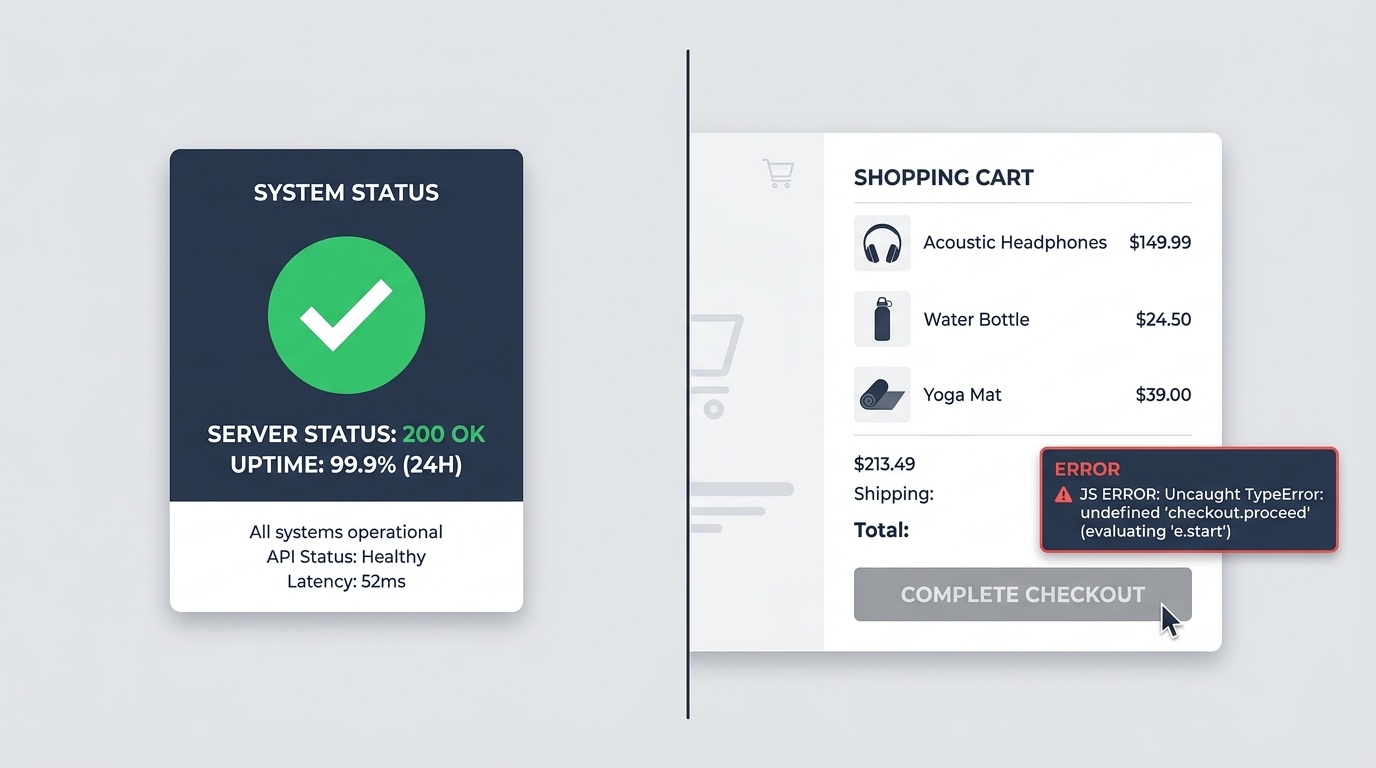
Your server status badge is a proud green checkmark. Your ping monitor reports 99.99% uptime. Yet support tickets and abandoned carts tell a very different story: real shoppers are clicking "Complete Order" and nothing happens.
The 2-Minute Diagnostic Summary
If your online store works for your internal team but customers report it is broken, you are dealing with ghost downtime. The server is not down; the client-side execution layer is failing.
1. The Fallacy of HTTP 200: Why "Up" Does Not Mean "Working"
In the early days of the web, website monitoring was straightforward. A monitor sent an HTTP GET request to your homepage. If your web server responded with status 200 OK within two seconds, your website was working.
In 2026, modern e-commerce architectures (Shopify, WooCommerce, Magento, BigCommerce, or headless Next.js frontends) do not behave like static HTML pages. When a user requests your product catalog, the server delivers an empty shell populated by dozens of client-side JavaScript packages:
- Payment SDKs (Stripe Elements, PayPal, Apple Pay, Klarna).
- Marketing pixels and tag managers (Meta, TikTok, Google Ads).
- Customer support widgets, review carousels, and personalization engines.
- Cart drawer controllers and asynchronous AJAX checkout pipelines.
If a single third-party script crashes during execution, it can break the main JavaScript thread. The page looks completely normal, yet clicking "Add to Cart" or "Proceed to Checkout" produces zero response. To a ping monitor, you are 100% operational. To the customer with credit card in hand, your store is completely dead.
2. The 4 Most Common Causes of "Ghost Downtime"
When customer complaints begin trickling into your support inbox ("I cannot click the buy button" or "Checkout page is stuck loading"), here are the specific technical culprits you must isolate first:
A. Stale Edge CDN Cache Serving Mismatched Scripts
If you deploy a code update or theme release, your Cloudflare or Fastly CDN edge nodes might cache new JavaScript bundle URLs while some users in specific geographic locations still receive cached HTML referencing old, deleted bundle hashes. When their browser attempts to fetch a missing asset, it throws a 404 Not Found error on the cart bundle, freezing order submission.
B. Silent Ad-Blocker or Privacy Browser Conflicts
Over 35% of online consumers use ad blockers or strict tracking protections (like Brave or Firefox Strict Mode). If your checkout button code directly queries a tracking pixel before executing the checkout redirect:
// Vulnerable pattern: checkout hangs if marketing script is blocked
function handleCheckout() {
  fbq('track', 'InitiateCheckout'); // Blocked by client extension
  window.location.href = '/checkout'; // Never executes due to uncaught error
}
When an ad blocker terminates the tracking function, an unhandled exception halts the execution stack. The button click fails silently.
C. Third-Party Vendor Outages Crashing Your Store
You do not even need to change code on your store for things to break. If a third-party app vendor (such as a currency converter, review widget, or countdown timer) pushes a broken script update on their servers, that buggy script is loaded straight into your customers' browsers. A memory leak or prototype pollution in their code can hijack the DOM and disable your checkout trigger.
D. Invisible Overlay Elements (Z-Index Stealing Clicks)
Cookie consent banners, newsletter popups, or chat bubbles frequently leave invisible div containers across the viewport even when minimized. To the naked eye, the checkout button is sitting right there. But when the user taps or clicks, their pointer coordinates hit an invisible container with z-index: 99999 instead of the underlying button.
3. How to Test if Your Website is Really Working (Step-by-Step)
When a user claims your site is broken, testing it by simply visiting your homepage on your own office computer is virtually useless. You have warm local browser caches, zero ad blockers, and fast corporate internet. Instead, follow this diagnostic runbook:
Test from a Clean Incognito Profile with DevTools Open
Open Chrome in Incognito mode, press F12 to open DevTools, switch to the Console tab, and enable "Preserve log". Add an item to your cart and initiate checkout. Watch for red JavaScript exceptions.
Simulate Client-Side Ad Blocking
In Chrome DevTools, open the Network request blocking drawer. Block domains like *facebook.net*, *google-analytics.com*, and *clarity.ms*. Reload your store and check if the checkout flow still works flawlessly without those tracking scripts.
Verify DOM Actionability via Synthetic Browser Automation
Instead of manual periodic checks, deploy automated headless Chromium browser testing. A proper synthetic monitor does not stop at HTTP headers; it navigates to the live product page, verifies that the button selector is attached, visible, unobstructed, and triggers real navigation events upon clicking.
4. The Difference Between Ping Monitors and Real Synthetic Testing
Many e-commerce founders believe they are protected because they set up a free uptime monitor. But understanding the monitoring hierarchy is critical for protecting revenue:
| Monitoring Type | What It Measures | Detects Broken Checkout? |
|---|---|---|
| Ping / HTTP Monitor | Server response code (200 OK) | No (0% visibility into JS) |
| Synthetic Page Speed Test | LCP, FID, CLS, load timings | Rarely (only speed metrics) |
| Real User Monitoring (RUM) | Historical user browser telemetry | After shoppers have already lost orders |
| Continuous DOM Actionability (UptimeClick) | Real Chromium browser clicking purchase triggers | Yes (Instant alert with error screenshot) |
Never lose revenue to silent ghost downtime again
UptimeClick launches a headless browser every 30 minutes to physically verify that your Add to Cart and Checkout buttons are responsive, clickable, and error-free.
Frequently Asked Questions
Why do customers say my website is down when it works fine for me?
Most website monitoring tools only check HTTP status codes (200 OK). However, customers load hundreds of third-party JavaScript bundles, CDN cache layers, and localized scripts. If a tracking script throws an unhandled error, an ad blocker corrupts an API call, or an edge CDN serves a stale cart asset, the page freezes on their browser even though the server is completely healthy.
What is ghost downtime in e-commerce?
Ghost downtime occurs when a web server successfully delivers HTML (HTTP 200), but critical interactive elements such as Add to Cart or Checkout buttons fail to execute in the browser DOM. Traditional uptime monitors cannot detect this because they never interact with DOM elements.
How can I verify if my checkout button is truly clickable for users?
Rather than relying on basic ping monitors, run automated browser tests using headless Chromium instances. Synthetic browser checks test whether button elements are attached to the DOM, visible, unobstructed by invisible overlay containers, and capable of receiving click events without throwing fatal JavaScript runtime errors.