How Third-Party Scripts Break E-Commerce Checkout (And How to Prevent It)

UptimeClick Operations
6 min read
The Hidden Risk in Modern E-Commerce Stacks
The average e-commerce storefront runs between 20 and 45 external scripts simultaneously. These include Meta and TikTok tracking pixels, Google Tag Manager containers, customer support chat bubbles, review stars, currency switchers, heatmaps, and personalization popups.
While each marketing tool serves a measurable business purpose, they all execute in the exact same shared client environment: the customer’s browser main thread. When a remote script pushes an unannounced update or throws an unhandled runtime error, your store’s core revenue engine can grind to an abrupt halt.
The Anatomy of a Client-Side Checkout Crash
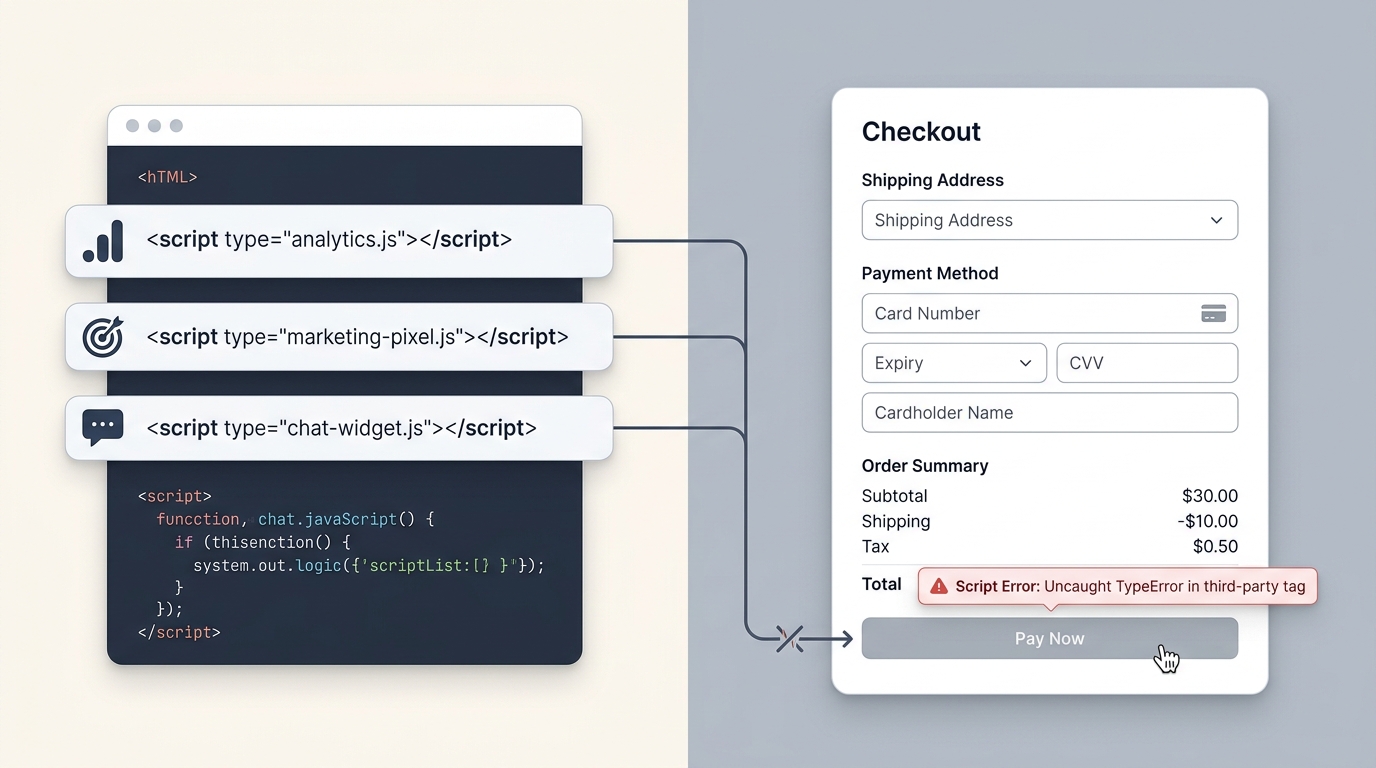
Unlike server outages where a web host returns a 502 Bad Gateway or 500 Internal Server Error, third-party script failures are completely silent. Here is the exact sequence of how a broken script kills sales:
- Asynchronous Injection: A customer opens your cart or checkout page. The browser initiates downloads for your store layout along with 30 external script bundles.
- Uncaught Global Error: An external analytics vendor pushes a minor update that fails on certain mobile user agents, throwing an
Uncaught TypeError: Cannot read property ‘init’ of undefined. - Thread Interruption: Because the script was executed synchronously or within the primary window scope without an error boundary, the JavaScript engine halts subsequent script execution.
- Dormant DOM Element: The “Proceed to Checkout” or “Pay Now” button is rendered in the HTML, but its click event listener was never registered. The customer taps or clicks repeatedly, nothing responds, and they abandon the store forever.
The 3 Most Common Script Conflicts on Storefronts
1. The Tracking Pixel Hijack
Many conversion-tracking snippets attempt to intercept purchase button clicks to guarantee attribution before the user navigates away. If an ad-blocker or browser privacy feature restricts the external tracking domain, a poorly written snippet will hang the page navigation promise indefinitely.
2. DOM Mutation and Hydration Collisions
Modern headless storefronts (Next.js, Remix, Hydrogen) and reactive cart frameworks rely on virtual DOM hydration. If a customer review widget or discount banner injects raw HTML into the form structure before hydration completes, React or Vue can throw a hydration mismatch error, unmounting the entire checkout component.
3. Transparent Overlay Invasions
Live chat bubbles and promotional discount wheels often render invisible bounding boxes that cover significant portions of the mobile viewport. Even when visually minimized, their CSS pointer-events or high z-indexvalues can intercept touch events meant for the “Add to Cart” or “Checkout” buttons.
Engineering Safeguards to Protect Your Revenue
To ensure third-party marketing tags never interrupt core e-commerce transactions, development teams should adopt these operational standards:
- Zero External Tags on Pure Checkout Pages: Keep your final payment routes as lean as possible. Unless an integration directly processes billing or fraud prevention, eliminate it from the checkout URL.
- Isolate Event Handlers with Defensive Try/Catch Blocks: Never allow third-party tracking calls to block primary navigation. Wrap all external pixel triggers in timeout-guarded asynchronous promises.
- Offload Marketing Pixels to Web Workers: Leverage modern client-side architectures like Partytown to run analytics scripts in background Web Worker threads, freeing the main thread for checkout interactions.
- Enforce Strict Content Security Policies (CSP): Define strict allowlists of external domains permitted to run script tags on your store, preventing unauthorized script injection.
Why Synthetic DOM Verification Is Essential
Because third-party script crashes occur entirely inside user browsers, traditional ping monitors (which only check HTTP 200 OK headers) are blind to them. Your server can have 100% uptime while 100% of your shoppers are locked out of buying.
The only reliable defense is synthetic monitoring that loads your store in a genuine Chromium browser engine, waits for all scripts to hydrate, and physically verifies that purchase selectors are visible, unblocked, and interactive.