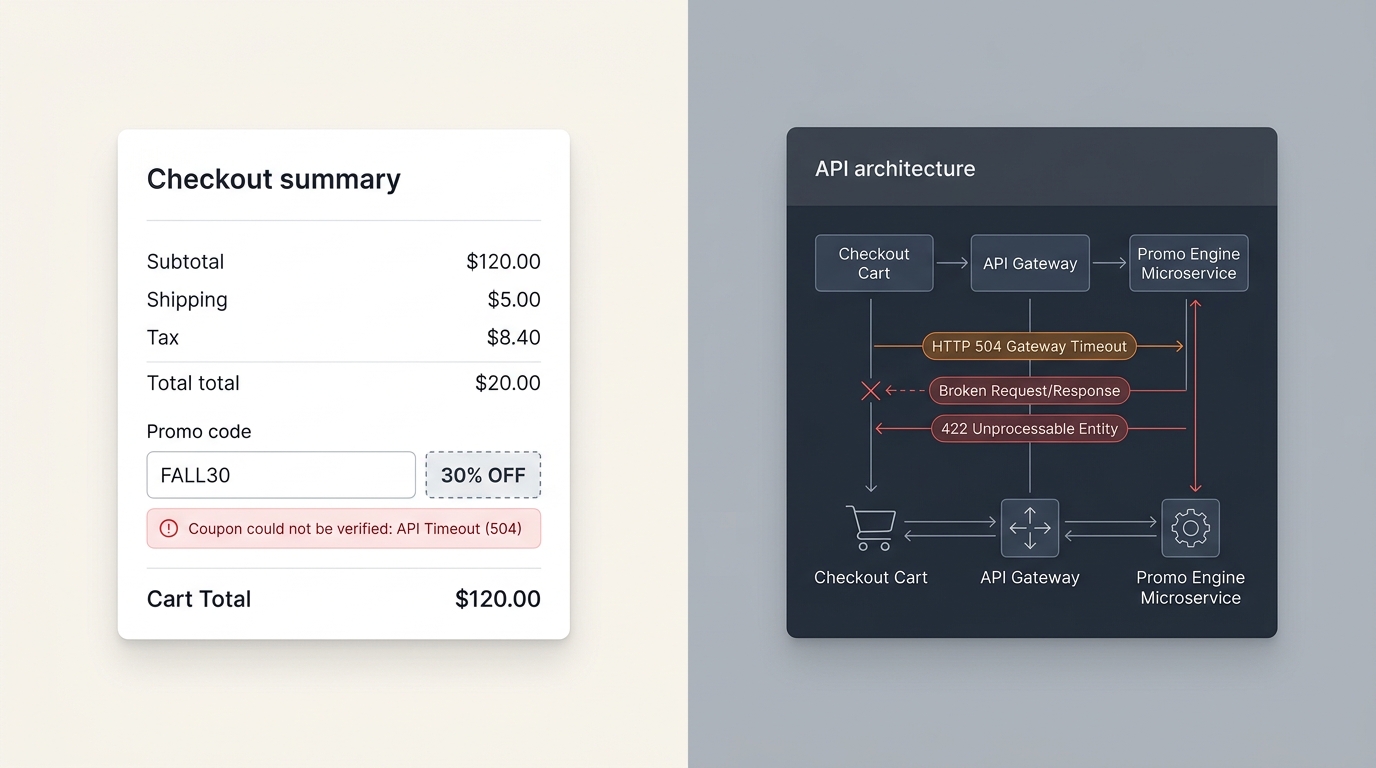
Why Discount Codes Stop Working at Checkout (And How to Fix It)

UptimeClick Infrastructure Team
9 min read
The High-Intent Shopper’s Breaking Point
You spent hundreds of ad dollars driving traffic to a seasonal promotion. The buyer selected their products, added them to the cart, and arrived at checkout clutching a promotional code from your email newsletter or social media campaign: SAVE20.
They paste the coupon into the promo code box and click “Apply”.
Instead of an instant total deduction and celebratory green badge, one of three fatal failures occurs:
- The Infinite Spinner: The input button enters a loading state and spins indefinitely, freezing the entire order summary.
- The False Rejection: A generic crimson warning pops up: “Unable to verify coupon”, “This discount code isn’t valid for the items in your cart”, or “An unexpected error occurred while applying discount.”
- The Cart Reset: The page reloads via AJAX, but the cart total remains full price while the coupon field disappears entirely.
When a discount code fails, the customer doesn’t think: “Oh, I’ll happily pay full price instead.” They feel cheated, suspicious that the promotion was deceptive, or frustrated that the store is technically broken. Over 68% of shoppers abandon checkout immediately when an advertised coupon fails to apply.
Want automated verification that your 'Place Order' button actually works?
Standard HTTP ping monitors only check server status codes and miss broken JavaScript hydration, invisible overlays, and disabled checkout buttons. UptimeClick runs real headless Chromium every 2 hours to verify that buttons like Place Order or Complete Purchase are physically actionable—alerting you immediately with error screenshots if a click fails.
The Coupon Validation Sequence: How It Actually Works
In modern e-commerce architectures (Shopify Plus, WooCommerce with headless checkouts, Magento/Adobe Commerce, BigCommerce), applying a coupon is far more complex than simple string matching:
If any single step in this asynchronous cascade encounters an unhandled exception, a rate-limited third-party loyalty API, or an edge-cache collision, the validation fails and the purchase button is locked.
The 5 Critical Architecture Flaws That Break Discount Codes
1. AJAX Race Conditions & Out-of-Order DOM Updates
When a user applies a discount code while the checkout is simultaneously recalculating shipping rates or tax rates (triggered by address autofill), two concurrent asynchronous requests fire to the backend:
// Thread A: Address update recalculating taxes & shipping
POST /api/checkout/update_shipping  -> Response in 380ms

// Thread B: Promo code application recalculating subtotal
POST /api/checkout/apply_discount   -> Response in 190ms
If Thread B finishes first, the frontend state updates the subtotal with the discount. However, 190ms later, Thread A finishes and overwrites the entire cart state with the tax response that was generated before the coupon was registered in the session.
The result? The discount momentarily flashes on the screen and then vanishes, leaving the customer confused and unable to re-apply the code because the backend thinks the code is already applied to an active session token.
2. Edge Caching & CDN Contamination of Dynamic Cart Fragments
Aggressive CDN caching (Cloudflare, Fastly, or Varnish rules) designed to speed up product pages can accidentally intercept dynamic checkout and cart endpoints.
In WooCommerce, for instance, coupon updates rely on endpoints like /?wc-ajax=apply_coupon. If your edge caching layer strips customer session cookies or caches the response header, the server returns an invalid security nonce error:
// HTTP 403 Forbidden or 400 Bad Request
{
  "success": false,
  "data": {
    "error_code": "woocommerce_rest_invalid_nonce",
    "message": "Cookie nonce is invalid or expired."
  }
}
Because the nonce was generated on a cached page rather than an active unique session, the checkout rejects every single discount submission across all users until the cache expires.
3. Third-Party Loyalty & Referral API Rate Limits (504 Gateway Timeouts)
Many modern stores do not handle discounts internally; they rely on third-party SaaS apps for loyalty points, influencer referral tracking, or dynamic volume tiers (e.g., Smile.io, Yotpo, LoyaltyLion).
When a shopper enters an influencer discount code, your checkout server makes a synchronous backend API call to the loyalty provider to verify usage limits. During traffic spikes (like a TikTok influencer post or Black Friday email blast), the third-party API exceeds its rate limit or slows down:
- The external API responds with
HTTP 429 Too Many Requests. - Or the connection times out after 10 seconds, returning
HTTP 504 Gateway Timeout.
Unless your checkout code includes an explicit timeout threshold and a graceful fallback, the checkout UI remains stuck on a loading spinner, preventing order placement.
4. Currency Conversion & Rounding Mismatches on Minimum Spends
If your store uses multi-currency plugins or Shopify Markets, discount conditions can fail due to floating-point rounding errors and fluctuating exchange rates:
- The rule dictates: “Spend $100 USD to get $15 off.”
- A customer in London builds a cart worth £82.40 GBP, which converts to $100.01 USD on the product page.
- At the exact moment of checkout calculation, the backend currency conversion service uses a slightly different exchange rate or rounds down to $99.98 USD.
The discount rule rejects the coupon because the subtotal is 2 cents below the threshold. The error message displayed to the shopper is opaque: “You do not meet the minimum requirements for this code.” The shopper sees £82.40 on their screen and abandons the cart in disgust.
5. Exclusion Rule Conflicts (Automatic vs. Manual Discount Stacking)
Shopify and WooCommerce both feature complex rules regarding whether manual discount codes can “stack” on top of automatic discounts (such as automatic free shipping, bundle discounts, or clearance markdowns).
If your store launches an automatic 10% sitewide sale, and an email newsletter sends out an exclusive 15% code without explicitly enabling “Can combine with product discounts” in your platform settings, entering the manual code will trigger an error or silently strip the automatic discount, driving checkout prices up instead of down.
Diagnostic Comparison: Root Causes & Solutions
| Error Symptom | Technical Cause | Affected Platforms | Immediate Resolution |
|---|---|---|---|
| Spinner spins forever on “Apply” | Third-party loyalty API timeout or unhandled promise rejection | Shopify, Headless, Custom | Set 3s timeout with graceful fallback to local discount lookup |
| “Invalid security nonce / expired token” | CDN / Edge proxy caching dynamic AJAX cart fragments | WooCommerce, Magento | Bypass cache for wc-ajax=* and set Cache-Control: private, no-store |
| Discount applies then disappears | Race condition between shipping recalculation and discount state | All platforms | Queue checkout mutation requests with an AbortController sequence |
| “Minimum requirement not met” | Multi-currency exchange rate fluctuation / rounding gap | Shopify Markets, WooCommerce | Add a 1-2% tolerance buffer on minimum spend conversion checks |
Step-by-Step Triage Checklist: How to Fix It Today
Follow this systematic diagnostic procedure to isolate and eliminate promo code failures:
Step 1: Inspect Browser Network Payloads
Open DevTools (F12) in Chrome, navigate to the Network tab, filter by Fetch/XHR, and type a coupon code into your checkout field:
- Look for the request URL (e.g.,
/api/discount/applyor?wc-ajax=apply_coupon). - Inspect the HTTP status code. If it returns
403(security nonce error) or429(rate limit), your CDN or external API is failing. - Examine the JSON response payload. If it contains an uncaught PHP error or truncated JSON string, your server’s response parser is crashing the checkout frontend.
Step 2: Enforce Request Queuing (Prevent Race Conditions)
If your developers built a custom checkout or single-page React/Vue flow, ensure that cart mutations are handled through a serial request queue rather than firing simultaneously:
// Example: Cancel in-flight cart calculations when applying coupon
let cartAbortController = null;

async function applyPromoCode(code) {
  if (cartAbortController) {
    cartAbortController.abort(); // Cancel competing shipping/tax requests
  }
  cartAbortController = new AbortController();

  try {
    const res = await fetch('/api/cart/apply-discount', {
      method: 'POST',
      headers: { 'Content-Type': 'application/json' },
      body: JSON.stringify({ coupon: code }),
      signal: cartAbortController.signal
    });
    const data = await res.json();
    updateCartUI(data);
  } catch (err) {
    if (err.name !== 'AbortError') {
      showDiscountError('Unable to apply discount. Please try again.');
    }
  }
}
Step 3: Review Discount Stacking Rules
In Shopify admin, navigate to Discounts > [Your Active Discount]. Scroll to the “Combinations” section and explicitly check:
- Product discounts (Can combine with other item-level promotions).
- Order discounts (Can combine with cart-wide percentage reductions).
- Shipping discounts (Can combine with free shipping tiers).
Why Traditional Uptime Monitoring Misses Broken Promo Codes
Standard server monitoring tools (like basic ping checks or port monitors) only ping your domain to check if the server returns an HTTP 200 status code.
When a discount code fails, your server is 100% online. The homepage works, the product catalogue loads, and the checkout page displays perfectly. But the moment a customer enters BLACKFRIDAY20, an unhandled JavaScript exception blocks the payment button.
To traditional monitoring, your store has 99.99% uptime. To your customers, your store is broken.
This is why leading e-commerce brands rely on synthetic browser testing with UptimeClick. UptimeClick spins up automated headless Chromium browser sessions 24/7 to:
- Add active inventory to the shopping cart.
- Navigate to checkout and input real test promotional codes.
- Verify that the subtotal recomputes dynamically within milliseconds.
- Assert that the primary “Place Order” or “Pay Now” button remains interactive, enabled, and clickable.
- Send instant alerts via Slack, WhatsApp, and email with exact console error logs the second a promo glitch occurs.
Frequently Asked Questions
Why does a coupon work in desktop Chrome but fail on mobile Safari?
Mobile Safari enforces aggressive Intelligent Tracking Prevention (ITP) and strict third-party cookie blocking. If your coupon validation relies on cross-origin cookies or local storage synchronization between an external promo microservice and your primary domain, Safari will drop the session token, causing the validation check to fail.
How do I prevent customers from guessing or brute-forcing discount codes?
Implement IP-based and session-based rate limiting on your coupon validation endpoint (e.g., maximum 5 attempts per minute). Crucially, ensure that rate-limit errors return a user-friendly notice (“Too many attempts. Please try again in 60 seconds”) rather than throwing a generic server crash that disables checkout buttons for legitimate customers.
Can discount codes cause payment gateway authorization errors?
Yes. If the discount reduces the cart total to $0.00 (e.g., a 100% off warranty replacement code), credit card processors (Stripe, PayPal) will reject the transaction because they cannot authorize zero-dollar charges without special bypass routing. Your checkout must detect $0.00 subtotals and route them through a zero-payment fulfillment handler.
Never Let Broken Discount Codes Freeze Your Checkout Buttons
UptimeClick continuously tests your checkout input fields, promo calculations, and buy buttons in real Chromium browsers 24/7. Get alerted the moment a promotional glitch threatens your revenue.