Why Your Checkout Button Loops Back to Cart (And How to Fix It)

UptimeClick Operations
6 min read
The Infinite Cart Loop: A Merchant’s Worst Nightmare
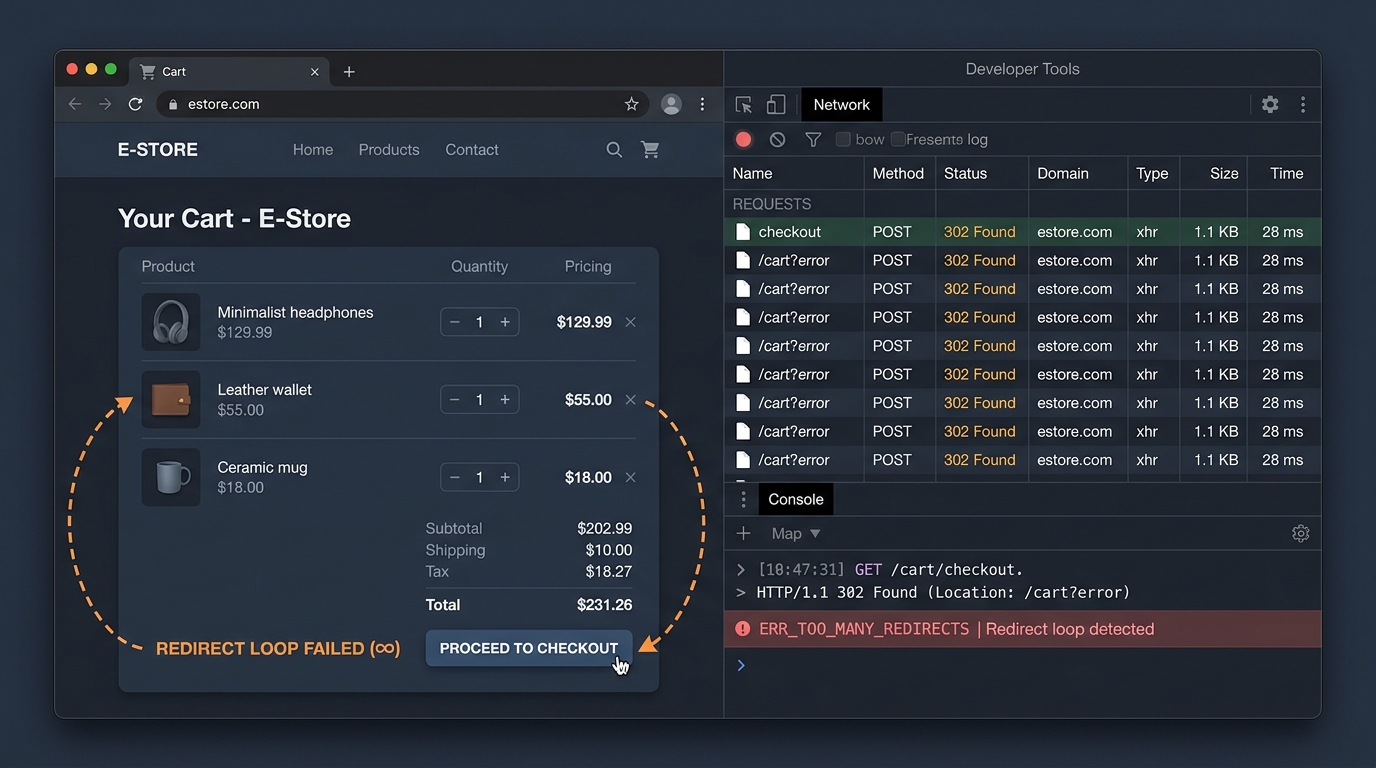
A customer browses your catalog, adds three high-ticket items to their basket, and clicks “Proceed to Checkout”. Instead of loading the shipping and payment gateway, the screen blinks for a fraction of a second and reloads the exact same cart page.
They click again. The screen blinks again. Frustrated, they close the browser tab and buy from your competitor on Amazon.
To your server monitoring dashboard, nothing went wrong. Both the initial cart page and the subsequent cart reload returned a cheerful 200 OK response code. Yet every single visitor attempting to buy on that session was trapped in an infinite redirect loop.
Why Checkout Redirect Loops Happen
Moving a shopper from a public cart page to a secure checkout environment requires a seamless handoff between unauthenticated session state and an encrypted payment container. When that handoff fails, the e-commerce engine defaults to safety: it redirects the user back to /cart.
The 4 Root Causes and Their Immediate Fixes
1. Corrupted Session Tokens and Cookie Policies
Modern browsers enforce strict cookie handling standards, including SameSite=Lax and Secure flags. If your store underwent an SSL migration, changed subdomains, or loads assets across mixed HTTP/HTTPS origins, the checkout engine cannot verify the cart session cookie.
The Fix: Verify that your entire storefront operates strictly under HTTPS with HSTS enabled. On WooCommerce, navigate to WooCommerce > Status > Toolsand trigger “Clear customer sessions” to flush corrupted visitor transients.
2. Third-Party Cart App Form Interception
Cart drawer apps, upsell slide-outs, and free-shipping progress bars frequently wrap or replace the native checkout button with custom JavaScript. When a customer clicks checkout, the app attempts to execute an asynchronous pre-checkout routine (such as tagging an upsell item or validating minimum order quantity).
If the app fails to resolve its promise or passes invalid line-item properties to the server, the backend form handler aborts the transition and bounces the user back to the cart.
The Fix: Open Chrome DevTools (F12), switch to the Console and Network tabs, and click the checkout button. Look for aborted POST /cart requests or 400 Bad Request payloads originating from third-party app scripts.
3. Aggressive Edge Caching on Dynamic Cart Endpoints
CDN services like Cloudflare, Fastly, or aggressive caching plugins (WP Rocket, LiteSpeed Cache) deliver incredible speed by caching HTML at the network edge. However, if cache rules inadvertently cache dynamic endpoints like /cart or /checkout, visitors will receive cached checkout tokens that have already expired.
When the payment server detects an expired or mismatched checkout token, it immediately triggers an HTTP 302 redirect back to the cart page.
The Fix: Ensure your CDN page rules explicitly bypass cache for all URLs containing /cart, /checkout, and /my-account. Set Cache-Control: no-cache, no-store, must-revalidate on dynamic checkout routes.
4. Shopify Subdomain Authentication Mismatches
On Shopify, stores migrating to the New Customer Accounts architecture frequently configure custom subdomains (e.g., account.yourstore.com). If DNS records or SSL certificates for the account subdomain are incomplete, the browser treats the checkout authentication redirect as an untrusted cross-origin request, bouncing the user straight back to the cart drawer.
The Fix: In your Shopify Admin, review Settings > Customer accounts. Confirm that your domain SSL statuses are verified and active across all primary and secondary store hostnames.
Why Traditional Uptime Checkers Are Blind to Loops
Most monitoring services test website availability by querying the homepage or checking whether an API responds with status 200. In a checkout redirect loop:
- The web server is fully operational and healthy.
- The cart page returns HTTP 200 OK without errors.
- The redirect returns HTTP 302 Found, which HTTP monitors follow until landing back at status 200.
Because no fatal 500 error is thrown, standard monitors report 100% uptime while zero shoppers can complete a purchase.
The only way to catch this silent killer is with automated synthetic browser testing. A headless Chromium engine navigates to the cart, clicks the checkout button, and verifies that the browser URL transitions to the genuine payment gateway URL rather than remaining on the cart template.